(Nederlandse versie hier)
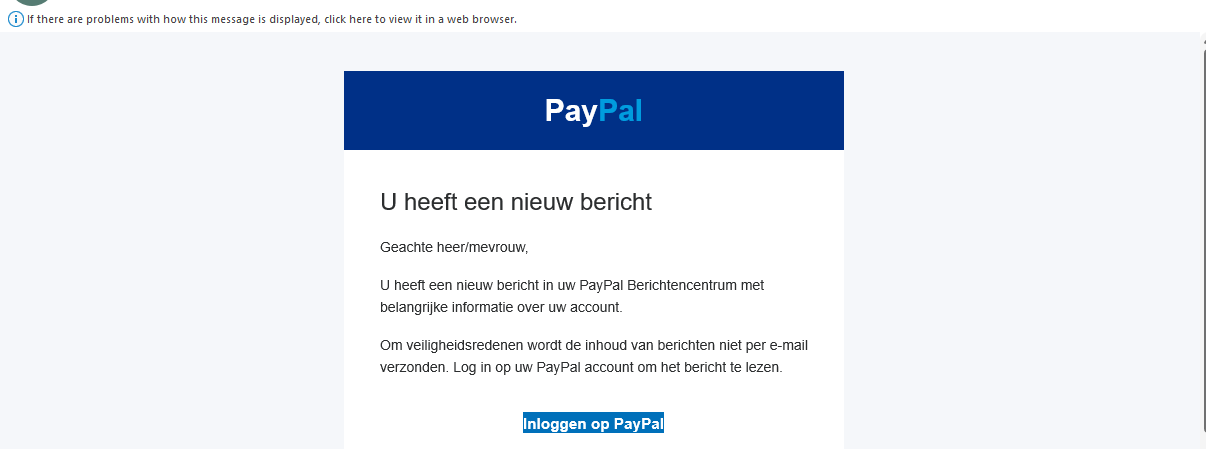
“This looks legit, right? No spelling errors, and it looks just like the emails you regularly get from PayPal?”
Trust no one. It’s surprisingly easy not to take any email at face value, and I want to show you how you can do that.
I know that this is a long read, but there are really two things to look at: the sender address, and the link text.
In a phishing email, these two invariably contain the red flags that anybody should be able to spot, and that should have you decide if you should toss the email, or if you can trust it.
And if there is anything in this text that I haven’t explained sufficiently, please drop me a line in the comments section below.
Let’s take a look at the entire email. We’re going to look in two places:
- who sent this email? (the sender address)
- where are they taking us? (what’s under the link or button they want us to press).
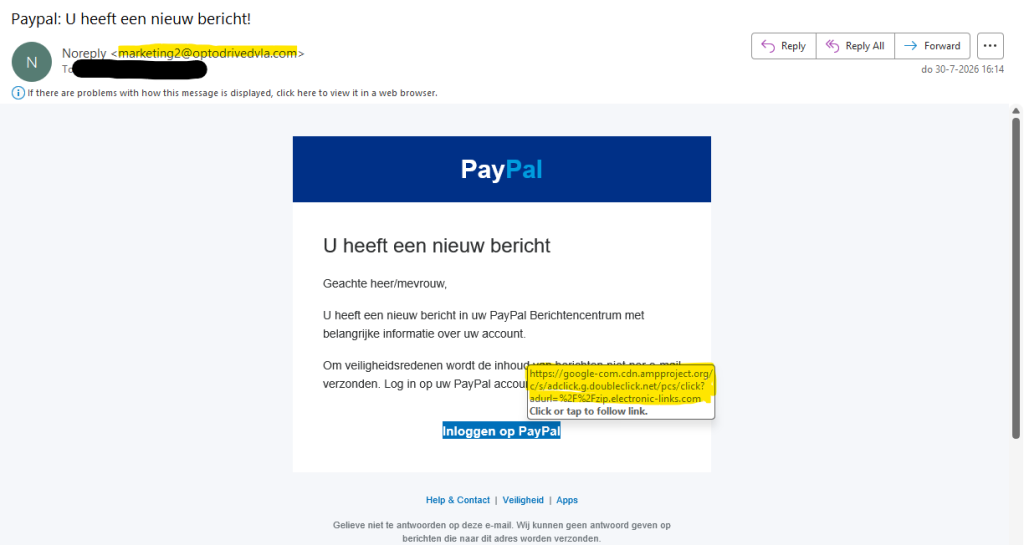
We can immediately see two serious red flags.
First of all, if PayPal sends you a message, you’d expect the FROM-address to contain “paypal.com”, right? If it doesn’t, that’s a huge red flag.
Mind you, even if it would show up as “noreply.paypal.com.something.else”, it would be suspect. I own the domain peterhuppertz.net. Creating an email address like “noreply@paypal.com.peterhuppertz.net” can be done in less than five minutes. An email address like noreply@something.else.paypal.com would be fine, but if it does not end unambiguously in .paypal.com, PayPal is not the sender. Note the dot before paypal.com — servicepaypal.com is not Paypal, but service.paypal.com is!
Also, whatever comes before the @-sign is not important. Creating an email address paypal.com@peterhuppertz.net would take me less than twenty seconds.
If I can do it, somebody else will do it.
Do not be fooled by the name (“Noreply” in the example above). What you should look at is the real sender address, which is between the <> signs in mail clients like Outlook or Gmail.
The email address evilhacker@shadydomain.ru could easily show up as paypal.com <evilhacker@shadydomain.ru>.
Some mail clients (mostly webmail clients) will not show that immediately.
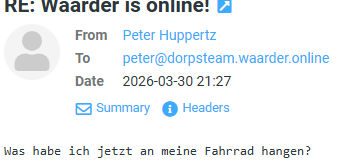
But if you hover your mouse cursor over the name of the sender, you should see the true email address either to the right of the mouse cursor, or sometimes at the left-hand bottom of the mail application.
“But my spam filter let it through… so it must be safe, right?”
… err, no. Spam filters get smarter, but so do spammers. The fake PayPal email in fig. 1 was peppered with invisible characters, which caused the spam filter to actually deliver it to the inbox of one of our friends — and ironically, it almost cost him €500.
“OK, got it. But how about on my phone/tablet?”
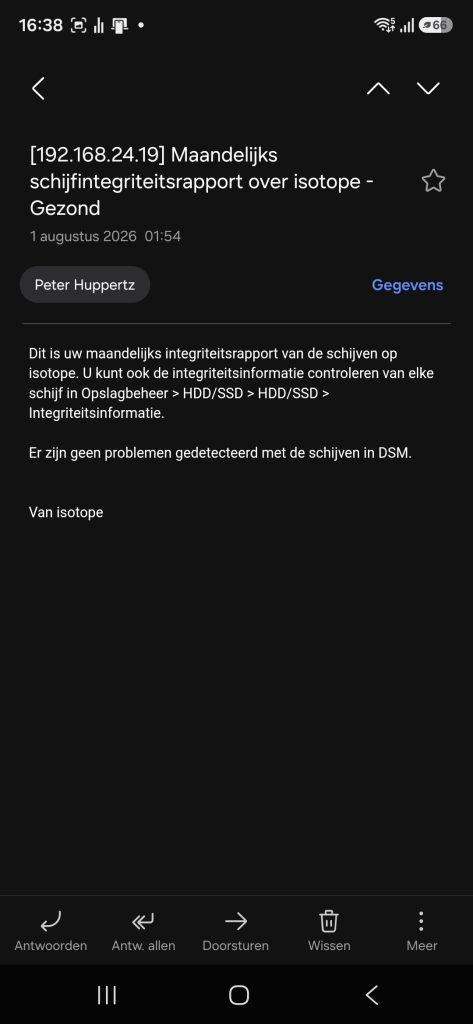
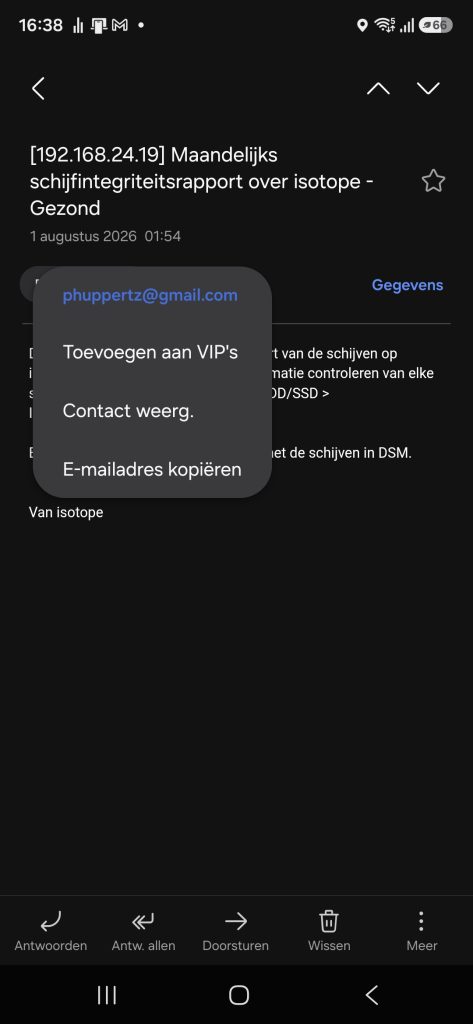
On Android phones, it depends on what mail app is on there. I know that the Samsung mail app will show the name only (left screenshot), but if you click it, you get the actual email address of the sender (right screenshot).
The same works in Outlook for Android, and I guess many other email clients will work the same way. If you have an iPhone or iPad, my answer is “I don’t know”. I don’t have one, and I don’t want one. But I would suspect it would work the same way on an iPhone or iPad.
Links in emails
Usually, a phishing mail will contain a button or a link it wants you to press. On a computer, if you hover your mouse cursor over the button or link, the email client should show you the address of the web site (the URL) that the link would take you to if you would click it. Some clients will show it right at the cursor like the example in fig. 1, some will show it at the left-hand bottom.
On a phone, the equivalent of the hover is the “long press”. If you tap a link, you will open it, but if you “hold the link down” for half a second or so, your mail program should show the link at the bottom, rather than open it.
This is one of the most important ways to discover if a mail is legit or rogue, so it really pays to figure out how your mail program can do this.
What to look for
If the link is something simple like “http://whinyhunters.ru”, we know enough. If you don’t need help with it, don’t send it to the recycle bin, just hard-delete it.
If you would like someone who knows about this stuff to take a look at it, send it to the junk folder. This will usually prevent you from clicking the link. Then, contact your tech-savvy niece, and ask for help.
But the phishermen are getting craftier.
In the example in fig: 1, the link is https://google-com.cdn.ampproject.org/c/s/adclick.g.doubleclick.net/pcs/click?adurl=%2F%2Fzip.electronic-links.com.
This is a good example of a link that looks somewhat trusty (it starts with google), but is in fact a redirect. A redirect is what happens if you go to an address, and at that address, you find a sign saying “no, you should go here”, sending you to another location on the Web. The example above sends you to adclick.g.doubleclick.net, and then on to electronic-links.com — and ending up at electronic-links.com is exactly what made a friend of mine come this 🤏 close to losing 500 euros.
In general, it’s safe to say that if a url contains more than one domain name, that’s a red flag the size of a football field. Including the stands, the fireworks, and possibly the VAR-check screen.
“Whoa, whoa, slow down. What’s this domain name thing?”
Consider this example:
https://paypal.com/signin/
paypal.com is the domain name, and the /signin/ part points to a resource within that domain.
An example of a redirect link:
https://accounts.google.com/ServiceLogin?continue=//myaccount-security.com/auth
The first domain (accounts.google.com) looks legit, but what this link does is: it redirects you to another domain called myaccount-security.com. I happen to know that ending up at myaccount-security.com is like suddenly finding yourself in a dark alley in a shady town on a moonless night, during a thunderstorm, and with no law enforcement in sight.
But you don’t have to know that. The bottom line is: a reputable organisation that wants you to login to your account will never use a redirect, so you should never see more than one domain name in the link, and it should be the domain name of the organisation they claim to be.
But even if there is only one domain in there, things might still be fishy.
Here’s another example:
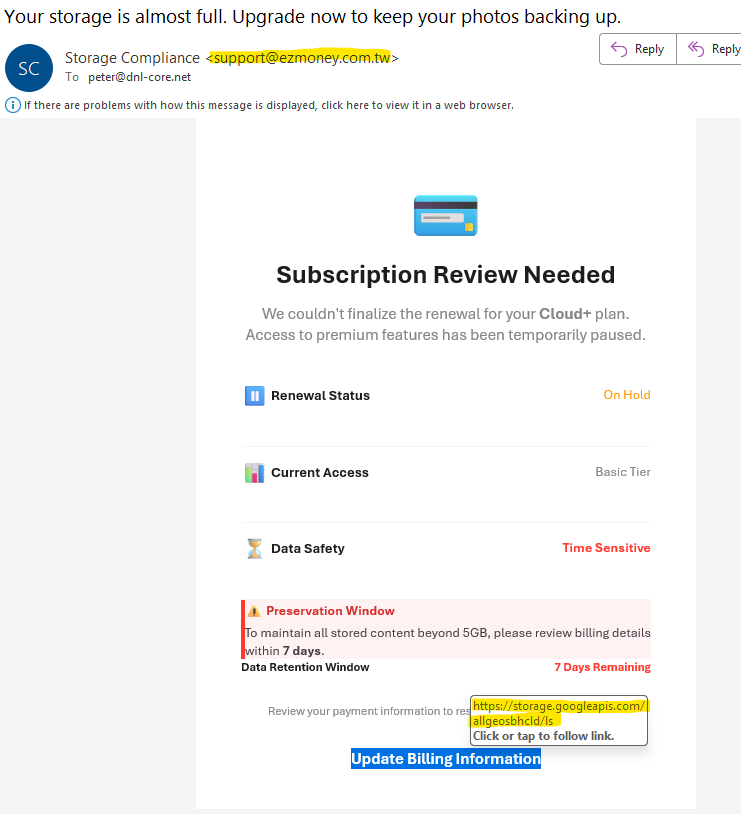
The first red flag of course is the email address. I mean, they’re not even trying… “ezmoney.com.tw”? Seriously? This alone would make me introduce this email to my digital flame thrower.
But look at the link.
https://storage.googleapis.com looks legit, right?
Yes, storage.googleapis.com is perfectly legit. More innocent than a basket of kittens on Youtube.
But googleapis.com is also like the lobby of an office building where everyone, including roguewebsite.ru can rent office space. What is stored here might be another redirect to a web site where you’d rather not find yourself — or even a carefully crafted web page that looks exactly like your bank’s page… or Paypal’s login page, for that matter.
A list of sites currently massively abused by scammers:
- storage.googleapis.com
- googleadservices.com
- pages.dev
- workers.dev
- appspot.com
- azurewebsites.net
- amazonaws.com
- herokuapp.com
- facebook.com/l.php
- linkedin.com/safety/redirect
- go2cloud.org
- trafficsystem.biz
- clickmanager.org
The ground rule
It’s safe to say that, if the legit Paypal organisation wants you to log on to their web site, the link under the button would be something like “https://paypal.com/[login page]”. So, if you see something else there, the best idea is to not trust it any further than you can throw it.
But this is not just about emails prompting you to log in. Take this one:
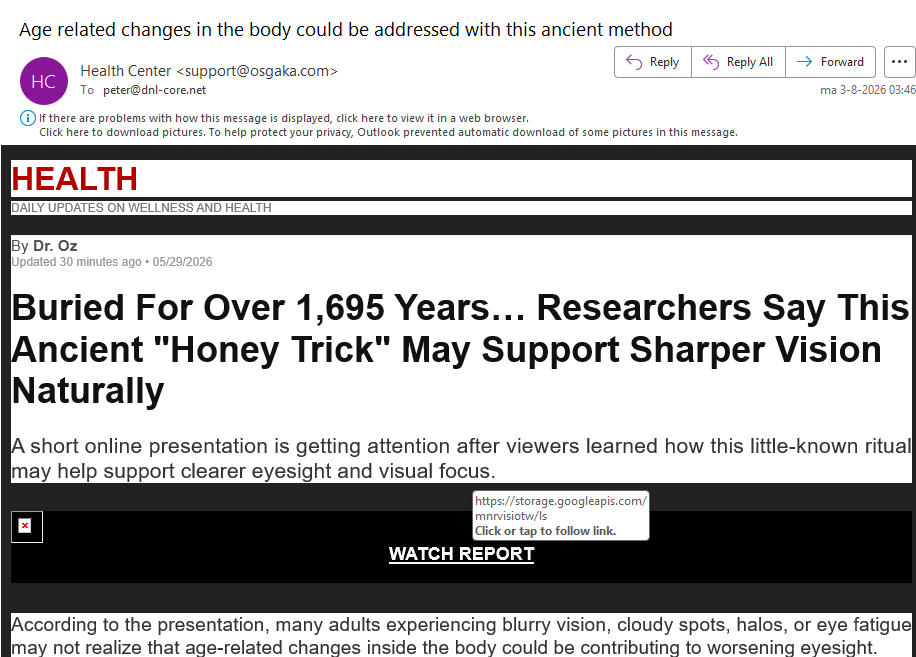
Another case of an obtuse link hidden behind storage.googleapis.com. Let’s not go there, thankyouverymuch.
Out of curiosity, I actually took a look at the HTML I found there, and lo and behold, it contains a redirect link to a site I wouldn’t trust with a plastic house plant. On top of that, it does a trick that prevents the page from being included in your browing history, this trying to prevent forensics. Nobody without malicious intent would do this.
And please don’t think “if it asks for a password, I’ll just close it”. It might even contain some Javascript with malicious code that will execute as soon as you open it! Just bin it.
https: versus http:
A link to a web site will always start with either http: or https: The s at the end of https is for Secure.
Modern browsers will complain loudly if they are sent to a web site that uses http, which might (and often does) make people think “if the link starts with https:// I should be Safe, right?”
I bet you saw this coming: the answer is no.
The use of https: tells you two things:
- your connection to this site is encrypted, and
- the owner of the site is who he pretends to be – there is a certificate on the site that is issued by a certificate authority that verifies the domain name.
But it doesn’t tell you that the owner of the domain isn’t a criminal.
You are now looking at https://peterhuppertz.net. Unless I screwed something up badly, allowing others to hijack my site, or my domain name and my certificate, that means that you can be reasonably sure that I am indeed Peter Huppertz. But Peter Huppertz could still be a nerd with glasses working from an attic room well into the wee hours, with bad intent. If you know me, you are aware that I am indeed a nerd with glasses working from an attic room well into the wee hours. Just not with bad intent. But if you don’t know me, then there’s no way to tell for sure.
So, if you feel safe browsing to https://peterhuppertz.net, that’s because you trust me. Thanks.
So, if you get a mail from an email address at paypal.com, and you find out that the link directs you to https://www.paypal.com, that’s okay.
But if the link directs you to https://paypaI.com, you should be on high alert.
“… wait, what??!? They’re exactly the same!”
No, they’re not. Surprising, isn’t it?
Consider this link:
https://peterhuppertz.net/isthislinkvalid
Hover over it, and see what that looks like.
Now, test this one:
https://peterhuppertz.net/isthisIinkvalid
Hover over both. Can you see the difference?
The difference between a lower case l (l for Lima) and an upper case I (i for India) can be extremely subtle, depending on the font used.
Someone with bad intent can actually register paypai.com and actually get a valid certificate for it.
Bottom line: even though a link might start with “https://”, that in itself doesn’t mean you can trust it.
But if it’s a link like “https://yourbank.com/something”, and you are sure that’s your bank’s web site, and they don’t rent out space under their name to others, then you should be good.
Anecdote: I once created a class called
PhonecallIllegalOperationException
Then I saw how this class name was rendered in the error message:
PhonecallIllegalOperationException
It almost hurts physically, doesn’t it?. I decided to rename the class to something else (I can’t remember what I renamed it to).
But I digress. Back to our topic.
Checking the sender’s email address as well as any links in the message should sort you out, and it definitely pays off to figure out how you can do this yourself in your email program or app.
“Doesn’t that produce false positives?”
It sure does. I recently got an email from an organisation with whom we do have a relationship that includes maintenance. The sender address panned out, but the link they provided for confirming a date (or to choose another date) for our regular maintenance raised a red flag.
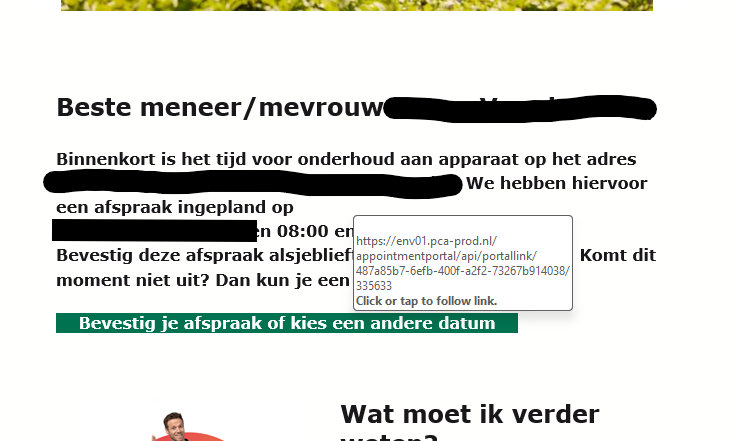
The server it pointed at (env01.pca-prod.nl) could not be associated with their organisation’s domain name.
Out of curiosity, I examined the SMTP header (which is nerd stuff that I will not bother you with), and none of the host names associated in transfering the message were inside the organisation’s domain.
So, what did I do? I called them (using the phone number on their web site, not the phone number in the email!), explained why I wouldn’t click the link, and asked them if they had something scheduled at our address on that date, and asked them to manually confirm this themselves.
Other warning signs
If an email urges you that immediate action is required: be suspicious! If I’d get a euro for each email that tells me that my cloud storage is full and all my photos and videos will be deleted if I don’t respond immediately, I could stop worki– wait, I’ve already retired. But you know what I mean.
Same for all emails that tell me that if I do not claim my parcel today, it will be returned to sender.
If an email offers you a valuable gift, or a ridiculously high discount: remember, if it seems too good to be true, it usually is.
What to do when you’re in doubt
That’s simple: don’t click any links, and close the email.
If it’s an organisation you know and you do have a relationship with, phone them or email them. But don’t call them or mail them at the number or address in the email, and definitely don’t hit reply!
At the risk this post will be read hundreds of times:
As long as I am not overwhelmed, I’ll happily look at that email you’re not sure of. If you want me to take a look, open a new email to peter@peterhuppertz.net, and, from your inbox, drag the mail you want me to look at into your empty email, so that the email gets included as an attachment.
Mind you, on a phone or tablet, this is often impossible. The best idea is to do it from a Windows- or Linux-machine, or from an iMac or Macbook.
Another way to do this is to see if your email program or app has the option “forward as attachment”. This allows me to inspect the actual email, including the SMTP header, and tell you what I think of it.
That’s all, folks!
If you have any questions or remarks, feel free to drop a comment!
Leave a Reply